Tutorial - Creating an abandoned Graveyard Diorama by Oliver Spaeth
- 11 views
This model is hosted on MyMiniFactory. Files, images and license details belong to the original creator.
View on MyMiniFactory ↗Description
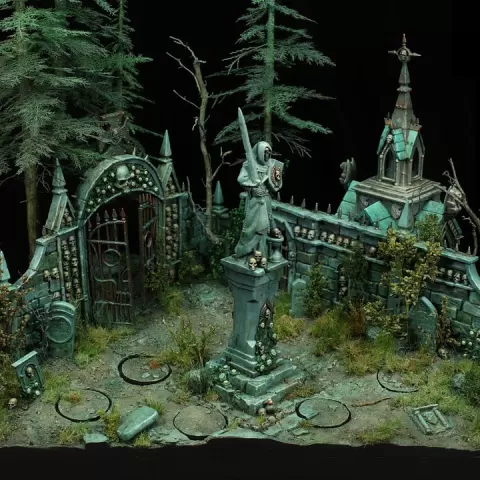
Digital Product. ----------------------------------- Hello, here is the complete Tutorial how I created an abadonned Graveyard for Terrible Kids Stuff (Miniature company). For the key graveyard elements I used the set from Games Workshop. My goal was to use some commercial pieces to save some time during the project, but with placements and concept, vegetation and interesting landscape still create an unique and special diroama. Beside that the diorama is about creating the mystic and abadonned feeling for the complete piece. For that we took special color recipes and also searched for good tree sets so that we can realize realistic and intersting trees. For the other vegetation we used a wider range of different products which are all explained detaily in the Tutorial. I will show how I have build the diorama step by step, from concept, to sculpting, assembly, painting, vegetation and finishing washes. Beside that I explained all steps so that readers can easily understand them and know what's the reason of this step. All those tiny steps will lead to a good finished result. Overall the Tutorial includes 215 pages with many, many pictures and is splitted in 5 PDFs. English language. Here are the 5 parts listed with the main topics of each Tutorial. But overall it's an ongoing Tutorial explaining every step from start to finish. 1. Concept, assembly, sculpting landscape2. Adding trees, roots and more details3. Painting start airbrush, detail paint walls, chapel and earth4…
About this model
Tutorial - Creating an abandoned Graveyard Diorama by Oliver Spaeth is a paid 3D model in the Other category, shared by the MyMiniFactory community. You can download it for 3D printing and reuse it in your own projects under the terms of its original license.
File formats
- STL — The most common mesh format for 3D printing — ready to slice and print on almost any printer.
The files for this model are hosted on MyMiniFactory. Use the button above to open the original page and download it.