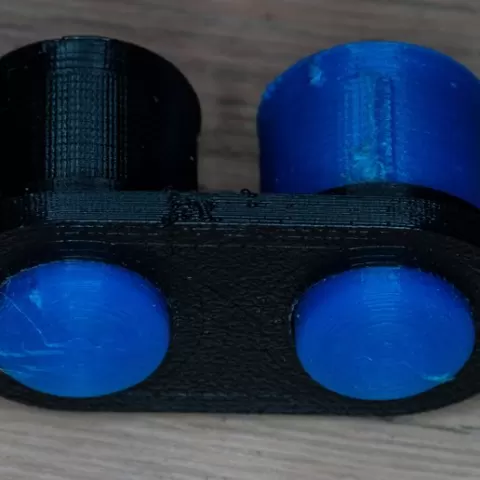
Customizable arcade button for tactile switch
- 20 views
This model is hosted on Cults3D. Files, images and license details belong to the original creator.
View on Cults3D ↗Description
This is an arcade button. The default design is for a 6x6x6 tactile button, with the arcade button having a 12 mm moving top, an 18 mm cutout, and a 22 mm crown. You can customize the crown to have space for multiple buttons. Print a crown, well and plunger. No supports are needed. Stick the tactile button into the well, squishing it in as low as you can with needlenose plyers. Then drop the plunger on top (with the indented part on top) and then put on the crown. Make sure everything clicks. Then glue with a bit of a superglue (you can drop it in from the bottom to stick the tactile button). The plunger is smoothed at the bottom and longish to prevent binding. You may need to sand the crown holes a little to make the buttons not get stuck. If you customize the dimensions, make sure that when you place the plunger on top of the tactile button in the well, without depressing the button, the shoulders of the plunger are slightly below the top of the well--only the narrower area should protrude above the well. Otherwise, the tactile button will be tensioned when you insert the crown, and it won't work reliably.
About this model
Customizable arcade button for tactile switch is a free 3D model in the Other category, shared by the Cults3D community. You can download it for 3D printing and reuse it in your own projects under the terms of its original license.
File formats
- STL — The most common mesh format for 3D printing — ready to slice and print on almost any printer.
The files for this model are hosted on Cults3D. Use the button above to open the original page and download it.







