Z axis gauge
- 19 views
This model is hosted on Creality Cloud. Files, images and license details belong to the original creator.
View on Creality Cloud ↗Description
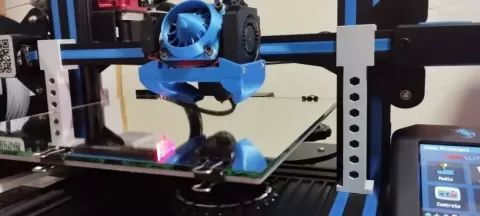
I made this support to adjust the dual axis of my Ender 3 V2.To make the adjustment, just do an Auto Home and with that the axis will go to position 10.5, you disable the motors, position the alignment guide and adjust by rotating the axis so that the guide is adjusted to the profile.After that go to printer control and advance the Z axis a little bit and remove the guides.Ready the Z axis will be adjusted, simple, fast and easy.
About this model
Z axis gauge is a free 3D model in the Other category, shared by the Creality Cloud community. You can download it for 3D printing and reuse it in your own projects under the terms of its original license.
File formats
- STL — The most common mesh format for 3D printing — ready to slice and print on almost any printer.
The files for this model are hosted on Creality Cloud. Use the button above to open the original page and download it.