Charge Caddy for Roku Rechargeable Remote USB-C Cable
- 12 views
This model is hosted on Cults3D. Files, images and license details belong to the original creator.
View on Cults3D ↗Description
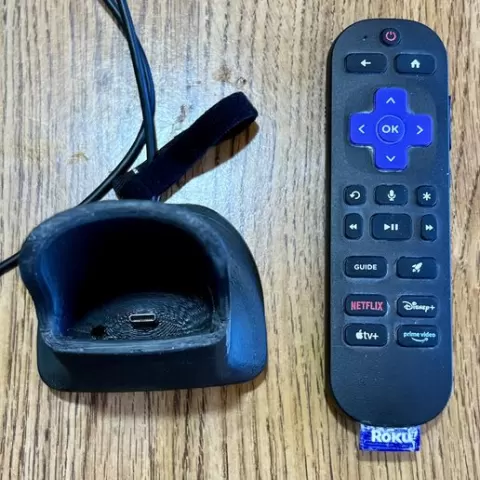
Why I Designed This I upgraded to Roku Ultimate Edition that came with a Rechargeable Universal Remote. No more batteries, no more broken battery covers. It came with a USB-C charging cable. I wanted the convenience of placing my remote into a charging caddy that would slide it right into the USB-C cable, so it would always be ready for use. How I Designed This I used my Einscan SP 3D Scanner to capture the 3D Geometry of the Roku Remote. I imported the 3D Scan as an .STL into 3D Design Software, and created the cradle holder. I modeled the USB-C cord using a digital caliper. I designed 2 halves of an insert to capture the USB-C cord, and then screw it into the bottom of the cradle. I designed threaded brass inserts for M5x0.8mm screws to be added: 10mm long inserts in the bottom of the cradle, and 5mm long inserts in the shallower end. I used a soldering iron to press the inserts into the cradle. 3D Roku Remote Scan included I'm including 2 versions of my 3D Roku Remote Scan: (1) 5MB .slt file with high resolution detail, and (2) 1MB .stl file that was suitable for importing into my 3D CAD Design Software that I used to create the Charge Caddy.
About this model
Charge Caddy for Roku Rechargeable Remote USB-C Cable is a free 3D model in the Other category, shared by the Cults3D community. You can download it for 3D printing and reuse it in your own projects under the terms of its original license.
File formats
- STL — The most common mesh format for 3D printing — ready to slice and print on almost any printer.
The files for this model are hosted on Cults3D. Use the button above to open the original page and download it.