Prusa i3 Mk2.5-Mk3 Extruder, Body and Cover R3 rework to align filament path - Eliminates squeaking - Improves flexible filament reliability by Nathan Whitchurch
- 12 views
This model is hosted on MyMiniFactory. Files, images and license details belong to the original creator.
View on MyMiniFactory ↗Description
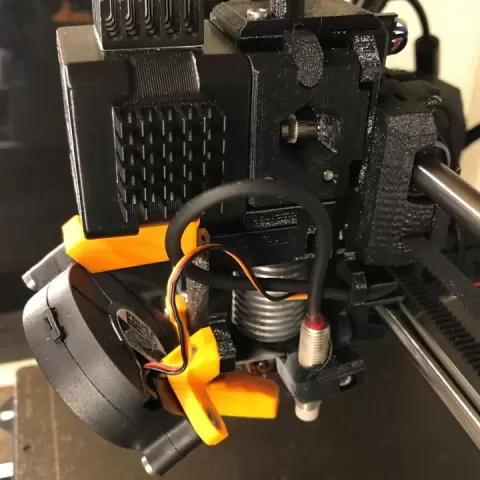
Please view full zoomed-in size of all pictures! STEP files are included for CAD users. Extruder Body and Cover are marked "N3" to distinguish them from the Prusa official parts. Updated for Mk3S and R4 parts here: https://www.myminifactory.com/object/3d-print-86329 This model is reworked from the R3 parts released by Prusa in August 2018. The R3 changes have overall been fantastic, but I had found that the filament path in the printed parts was not well enough aligned with the bondtech gears, and filament was always rubbing against the inside of the extruder (PETG squeaked horribly on my printer). The idler tension adjust also didn't seem to do much, since the drive gear of the bondtech pushed filament against the extruder itself (my printer was able to load, push, and unload filament with the idler door completely swung open). In order to fix that, I completely remodeled the top half of the extruder body in Fusion360 (as I wasn't able to just move the filament path from Prusa's .step file). These are drop-in parts for the Prusa i3 Mk3, and require no other changes other than disassembly and reassembly of the extruder. The new part cooling fan brace mounts with the original hardware (M3n nut and M3x25 screw) for the 2nd mounting hole on the part cooling fan, with the addition of an M3n nut and an M3x10 screw from the spare hardware bag. Moving the filament path (and the filament sensor) was the simplest solution; the alternative would have been to move the stepper motor…
About this model
Prusa i3 Mk2.5-Mk3 Extruder, Body and Cover R3 rework to align filament path - Eliminates squeaking - Improves flexible filament reliability by Nathan Whitchurch is a free 3D model in the Other category, shared by the MyMiniFactory community. You can download it for 3D printing and reuse it in your own projects under the terms of its original license.
File formats
- STL — The most common mesh format for 3D printing — ready to slice and print on almost any printer.
The files for this model are hosted on MyMiniFactory. Use the button above to open the original page and download it.