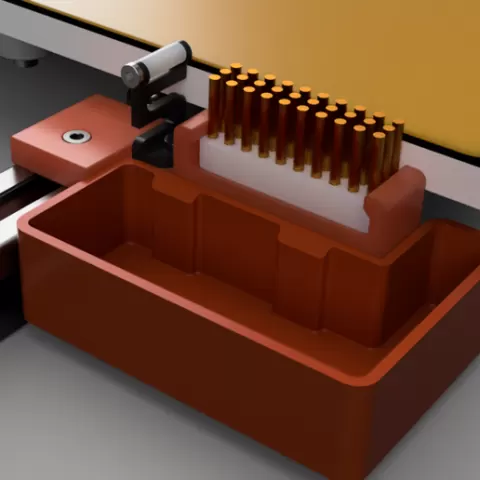
Voron 2.4 Nozzle Brush/Wipe
- 19 Aufrufe
Dieses Modell wird auf Cults3D gehostet. Dateien, Bilder und Lizenzangaben gehören dem ursprünglichen Designer.
Auf Cults3D ansehen ↗Beschreibung
See https://cults3d.com/en/3d-model/tool/voron-2-4-nozzle-brush-wipe-cad-files for CAD files. After trying out some designs available for brushes and wipers, I though I'd create my own design that would encompass both brush and/or Bambu Lab wiper; and an optional bucket for purging. I have a non-Bambu Lab wiper design, but that has been excluded from here for the moment. Cut the brush to 38mm long and slide it into the mount from the front. Fix the optional Bambu Lab nozzle wiper to the mount using the self tapping screw provided. Fit the completed brush/wiper mount to the rear of the printer using a single M3x8 bolt and a drop-in 2020 hammer nut. Push the mount as close to the bed as possible to allow the nozzle to reach the brush and/or wiper (I push the mount right up against the bed). Attach the optional bucket using four 6x3 round magnets; two on the mount and two on the bucket. This makes for easy attachment and removal as the magnets will align the bucket to the mount automatically. The Klipper script provided is to be used at your own risk and is for example only. Rename it to "nozzlebrush.cfg" and upload it to your config folder. Edit the required parameters in the config file, add an include to your printer.cfg file and reboot. A NOZZLEWIPE macro will become available. Try it without any parameters to ensure it brushes and wipes the nozzle as expected.
About this model
Voron 2.4 Nozzle Brush/Wipe is a kostenlos 3D model in the Sonstiges category, shared by the Cults3D community. You can download it for 3D printing and reuse it in your own projects under the terms of its original license.
File formats
- STL — The most common mesh format for 3D printing — ready to slice and print on almost any printer.
The files for this model are hosted on Cults3D. Use the button above to open the original page and download it.
Ähnliche Modelle
 Kostenlos
Ultra-Detailed World Cup Trophy Replica
 Kostenlos
小鸟口哨 | 加点水,吹出真鸟叫声小哨子!
 Kostenlos
Nome infilabile matita parametrico personalizzable
 Kostenlos
充电口清洁器(10分钟,1g耗材)
 Kostenlos
Monitor Alien
 Kostenlos
Coolclip - Kühlakkuhalter
 Kostenlos
Difusor ventilador auxiliar P2S y X2D
 Kostenlos