Voron 2.4 Nozzle Brush/Wipe
- 22 görüntülenme
Bu model Cults3D üzerinde barındırılıyor. Dosyalar, görseller ve lisans bilgileri tasarımcısına aittir.
Cults3D üzerinde görüntüle ↗Açıklama
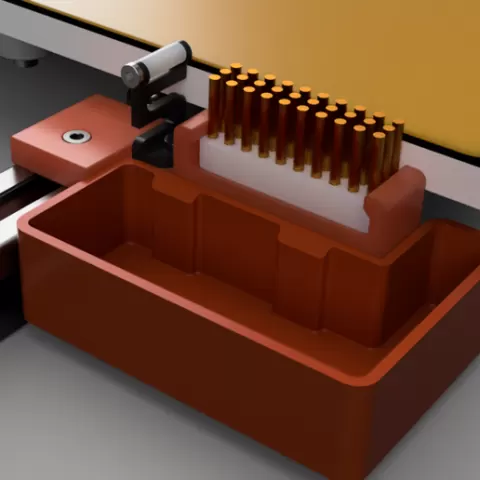
See https://cults3d.com/en/3d-model/tool/voron-2-4-nozzle-brush-wipe-cad-files for CAD files. After trying out some designs available for brushes and wipers, I though I'd create my own design that would encompass both brush and/or Bambu Lab wiper; and an optional bucket for purging. I have a non-Bambu Lab wiper design, but that has been excluded from here for the moment. Cut the brush to 38mm long and slide it into the mount from the front. Fix the optional Bambu Lab nozzle wiper to the mount using the self tapping screw provided. Fit the completed brush/wiper mount to the rear of the printer using a single M3x8 bolt and a drop-in 2020 hammer nut. Push the mount as close to the bed as possible to allow the nozzle to reach the brush and/or wiper (I push the mount right up against the bed). Attach the optional bucket using four 6x3 round magnets; two on the mount and two on the bucket. This makes for easy attachment and removal as the magnets will align the bucket to the mount automatically. The Klipper script provided is to be used at your own risk and is for example only. Rename it to "nozzlebrush.cfg" and upload it to your config folder. Edit the required parameters in the config file, add an include to your printer.cfg file and reboot. A NOZZLEWIPE macro will become available. Try it without any parameters to ensure it brushes and wipes the nozzle as expected.
Bu model hakkında
Voron 2.4 Nozzle Brush/Wipe, Cults3D topluluğunda paylaşılan ücretsiz bir Diğer 3D modelidir. 3D baskı için indirebilir ve orijinal lisans koşulları çerçevesinde kendi projelerinde kullanabilirsin.
Dosya formatları
- STL — 3D baskı için en yaygın mesh formatı — neredeyse her yazıcıda dilimlenip basılmaya hazır.
Bu modelin dosyaları Cults3D üzerinde barındırılır. Orijinal sayfayı açıp indirmek için yukarıdaki düğmeyi kullan.