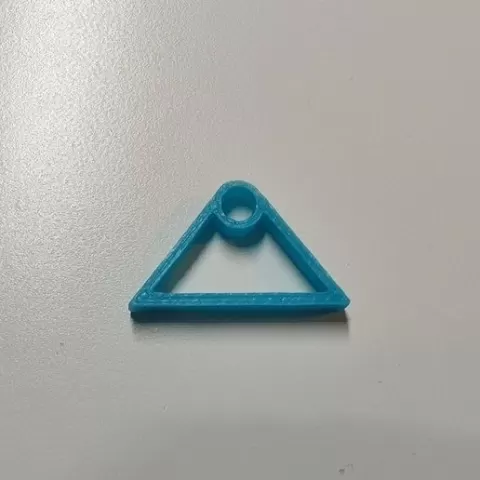
Anycubic Mega S Top Mount Spool Filament Guide
- 17 views
This model is hosted on Cults3D. Files, images and license details belong to the original creator.
View on Cults3D ↗Description
Anycubic Mega S Top Mount Spool Filament Guide I switched my Mega S over to the MK4 Direct Drive and found the filament all over the place and rubbing up against the spool holder mount. So I designed this filament guide to work with the Anycubic Mega/S General Mounting System (https://www.thingiverse.com/thing:4865663) I had designed earlier. Notes My bowden tube has an OD of 4.1 mm. The tube slides in with gentle pressure. If it's tight for you, you can drill the hole out a bit or, preferably, you can adjust Hole horizontal expansion setting in Cura (mine is set to 0.1 mm). If it's loose for you, use a drop of super glue. I'm using a 35 mm piece of tubing, but you can use any size greater or equal to 13 mm. Instructions 1. Mount top-beam-mount-1sided-ALT-v2b.stl onto the printer. 2. Glue filament-guide.stl onto attachment-v2.stl. 2. Slide attachment-v2.stl into top-beam-mount-1sided-ALT-v2b.stl. If you found these parts useful, please Like and post a Make. Thanks!
About this model
Anycubic Mega S Top Mount Spool Filament Guide is a free 3D model in the Gadgets category, shared by the Cults3D community. You can download it for 3D printing and reuse it in your own projects under the terms of its original license.
File formats
- STL — The most common mesh format for 3D printing — ready to slice and print on almost any printer.
The files for this model are hosted on Cults3D. Use the button above to open the original page and download it.
Similar models
 Free
Free
Cooler Can Holder (std 12oz can)
 Free
Free
Bottlecap Shoot for Different Beer Bottles
 Free
Free
Ikea 365+ Plastic Lid Hanger / Organizer
 Free
Free
Toothpick dispenser - fully printed (v2)
 Free
Free
USB cable organizer Box tray IPhone Samsung
 Free
Free
No-Slip Bed Sheet Lock
 Free
Free
Big screwdriver holder, honeycomb pattern / Velký držák na šroubováky
 Free
Free